Before editing one product, map the store and customer journey first
Have a Salla store with great products but not getting the visibility and sales you expect? The problem may not be your keywords alone. Discover how to structure categories, product pages, filters, and internal links to turn your store into a clear journey from search to purchase.
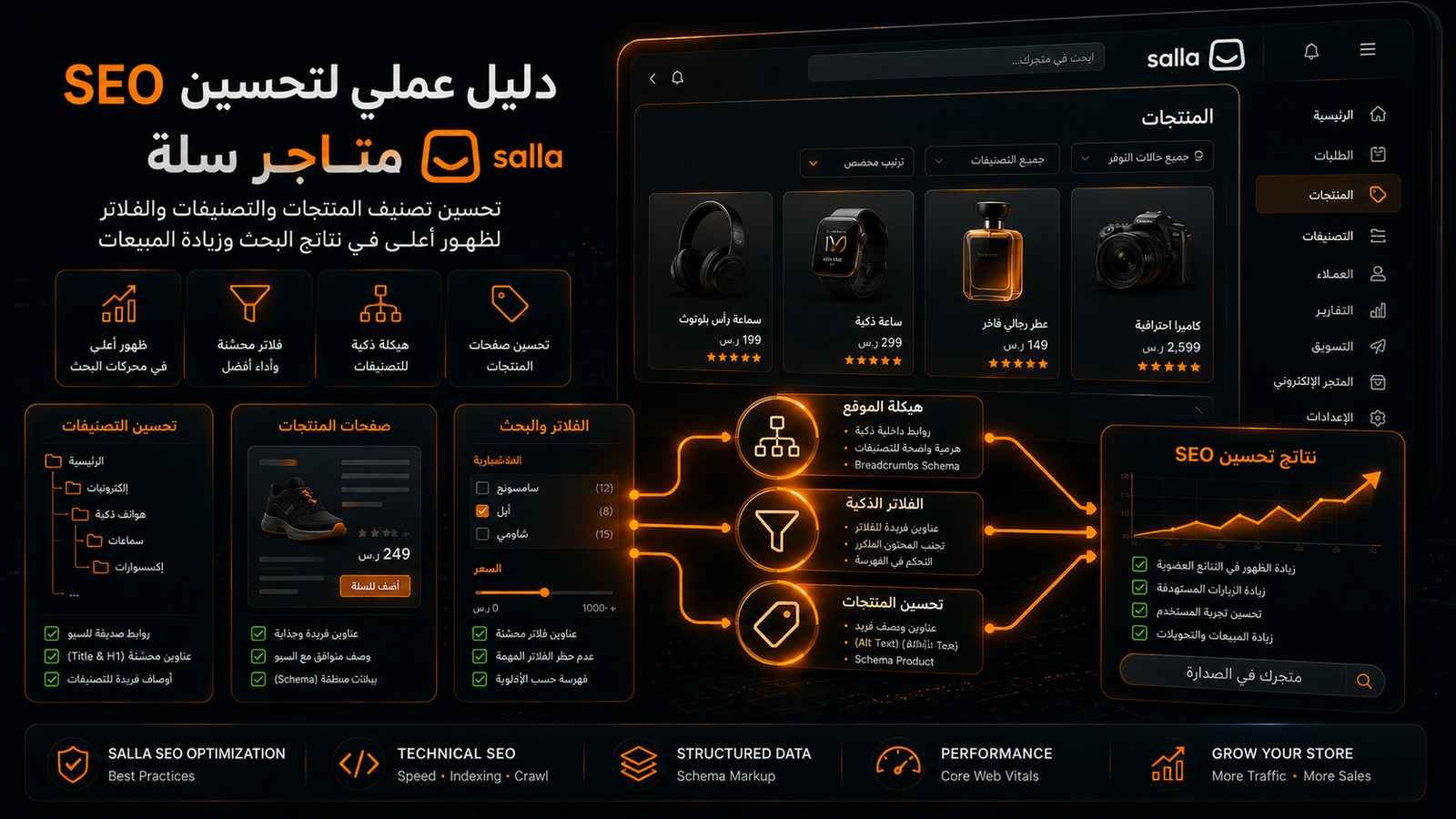
A Salla store can have strong products and still remain difficult to discover. The usual problem is not a shortage of keywords; it is a weak connection between categories, products, filters, supporting content, indexation and commercial measurement. This guide explains how to turn a catalogue into a structured search and shopping journey without relying on generic promises or unnecessary page creation.
Need to identify where your Salla store is losing qualified organic demand? Request a prioritised review from Mohamed Yahia on WhatsApp: +20 112 326 9452 |
Article Contents
Intent and keyword mapping • Category architecture • Product pages • Images and variants • Filters and pagination • Internal links • Content • performance • Indexation • Measurement • 90-day plan • Mistakes and checklist
What Salla SEO Actually Means
Salla SEO is the process of organising a store, its catalogue and its content so search engines can discover, understand and rank category and product pages for the right queries. It is not limited to editing title tags. It includes taxonomy, internal links, product content, duplicate URL control, image performance, indexation and commercial measurement.
The business goal is qualified discovery, not traffic for its own sake. A strong plan starts with product economics, priority categories, seasonality and target markets, then turns those inputs into a page and keyword map. Rankings matter, but the programme should ultimately be judged by product views, add-to-cart actions, assisted conversions and revenue from organic landing pages.
Why Salla Stores Need an Ecommerce-Specific Strategy
An ecommerce catalogue changes continuously. Products are added, paused and discontinued; stock and prices move; campaigns create temporary pages; themes and apps alter performance. These changes create search demand but can also generate thin, duplicated or orphaned URLs. SEO therefore has to operate as a catalogue system rather than a one-off content project.
Customer journeys also span several intents. A shopper may begin with a problem, compare product types, browse a category and finally search for a specific item. Stores that build useful pages for each legitimate stage can capture and guide that journey. Stores that rely on product names alone leave most non-brand demand to marketplaces and better-structured competitors.
Map Search Intent Before Search Volume
A high-volume keyword is not automatically the best target. Determine whether the searcher wants education, comparison, a category, a brand or a specific product. Intent decides which page should rank, how the content is structured and what action is appropriate. It also prevents several URLs from competing for the same query.
Group demand into category terms, use cases, problems, specifications, brands, local modifiers and seasonal searches. Assign each group to one primary URL. Closely related variations can live together when search results and user needs overlap. Create a separate landing page only when the intent, merchandise and decision criteria are genuinely distinct.
Build a Keyword-to-Page Map
A keyword map connects queries to pages, commercial value and funnel stages. Start with priority categories, then subcategories, flagship products and supporting guides. Record the primary theme, related questions, seasonality, target market and current URL. This creates a working brief for optimising existing pages and deciding where a new page is justified.
Do not create one page per wording variation. Consolidate terms that share intent and search results. After publishing, use Search Console queries to refine the map based on real impressions and clicks. Keyword research is not a static spreadsheet; it is an evolving decision system informed by catalogue changes and customer language.
Design a Clear Category Architecture
A useful taxonomy answers two questions quickly: where am I, and where can I go next? Keep the path from the home page to priority categories and products short. Use category names customers recognise rather than internal merchandising labels, and make important destinations available through standard HTML links.
Create subcategories where product type, use case or audience differs meaningfully and there is enough inventory and demand. Avoid fragmenting the catalogue into many near-empty pages. Navigation prominence should reflect commercial and search value. Review click depth and orphan pages whenever categories are added, renamed or merged.
Optimise Category Pages for Discovery and Choice
Category pages often have the strongest commercial potential because they satisfy broader shopping intent than a single product. A category should include a clear H1, a concise introduction, relevant available products, useful filtering, links to logical subcategories and enough guidance to help shoppers choose.
Keep the top of the page focused on products. Place deeper buying guidance below the grid: selection criteria, differences between types, use cases, delivery considerations and genuine questions. Write category-specific copy rather than repeating a template. Measure product clicks and conversion alongside rankings, because a category that attracts traffic but fails to guide selection is underperforming.
Write Better Category Titles and Descriptions
A category title should combine the recognised product class with a useful differentiator, not a chain of repeated keywords. The search description should explain the choice or value and encourage a qualified click. Each category needs distinct metadata that matches the visible page and current inventory.
Write for clarity first, then confirm that the primary phrase appears naturally and the title displays well. Avoid unsupported superlatives such as cheapest or best. Update seasonal wording when campaigns end or stock changes. Search snippets set expectations; misleading copy can raise clicks temporarily while reducing trust and conversion.
Create Product Pages That Resolve Purchase Questions
A product page should help a shopper decide rather than repeat a supplier feed. Use a clear name, useful original images, a benefit-led summary, accurate specifications, variant and availability information, delivery expectations and relevant return guidance. The page becomes stronger when it removes uncertainty before checkout.
Organise details with headings and lists. Explain who the product suits, what makes it different, how to use or care for it, and what the order includes. Keep temporarily unavailable products live when they are expected to return, and recommend close alternatives. Product content should support both discovery and a confident purchase.
Name Products for Humans and Search
A product name must make sense outside the internal catalogue. Combine the product type with a meaningful attribute, model or size when relevant. Internal codes alone are rarely helpful, while keyword-stuffed names reduce readability and can make every listing look the same.
Study the terms customers and search results use, then keep naming consistent across the title, H1, breadcrumbs and image context. Include the brand when it drives the decision. Give the use case more prominence when that is how customers search. Naming governance is especially important when several team members upload products.
Write Unique Product Copy That Converts
Strong product copy connects specifications to outcomes. Instead of listing a material without explanation, describe what it means for comfort, durability, maintenance or suitability. Be precise, distinguish facts from subjective claims and avoid promises that cannot be verified. Helpful copy can reduce returns as well as improve search relevance.
Use an editorial framework: value summary, ideal customer, benefits, specifications, usage, care and package contents. A framework creates consistency without duplicating sentences. Adapt examples and objections to each item. Review copy whenever suppliers, dimensions, features or included accessories change.
Optimise Product Images and Visual Discovery
Images influence purchase confidence and search discovery. Use sharp, representative images with descriptive filenames and alt text that explains what is visible. Include multiple angles, scale and real use where appropriate. Do not repeat the same keyword phrase across every image or use alt text as hidden advertising.
Compress assets and choose sensible dimensions without removing important detail. Prioritise the main image, then provide supporting images for features and variants. Test mobile loading because image-heavy catalogues can become slow. A visually rich page that delays interaction can lose both shoppers and the commercial value of organic traffic.
If multiple pages compete or fail to index, request a keyword-to-page map before making catalogue-wide changes: +20 112 326 9452 |
Manage Variants and Near-Duplicate Products
Whether colours, sizes and models should share a page depends on shopping behaviour and independent demand. Splitting every small variation can create many similar pages, while merging materially different variants can make a valuable query difficult to satisfy.
Keep a strong parent page when differences are minor and variants can be selected clearly. Create a separate page only when a version has independent demand, inventory, imagery and information. Review Search Console to identify URLs receiving the same queries; this can reveal cannibalisation or an unclear variant strategy.
Control Filters and Faceted URLs
Filters improve product discovery but may generate a very large number of combinations involving colour, price, size, brand and sorting. Most combinations do not deserve indexation. The strategy is to preserve useful filtering for shoppers while limiting low-value crawl paths and duplicate search landing pages.
Create fixed landing pages only for combinations with distinct demand, enough products and unique decision value. Treat sorting and arbitrary parameter combinations as interface states rather than SEO pages. Monitor indexed URLs and crawl patterns. A small catalogue should not appear to search engines as thousands of thin variations.
Handle Pagination and Incremental Loading
When a category spans multiple pages, products must remain discoverable through crawlable HTML links and stable URLs. Do not rely only on an infinite-scroll interaction that exposes no linked page states. Each paginated page should provide a reliable route to the products it contains.
Google recommends that each pagination URL use its own canonical rather than pointing every page to page one. The objective is not necessarily to rank page two; it is to let search engines reach products and understand the sequence. Test pagination after theme changes and ensure later pages are not empty, blocked or duplicated.
Use Internal Links to Guide Purchase Journeys
Internal linking explains relationships and distributes prominence. Link the home page to core categories, categories to subcategories and products, products to compatible items or alternatives, and guides to the most relevant commercial destination. Anchor text should describe what the shopper will find.
Do not leave priority products available only through internal search. Review click depth and orphan URLs. Editorial links should appear when a reader needs a choice or solution, not as a block of unrelated keywords. Good internal links support decisions and discovery at the same time.
Manage Out-of-Stock and Discontinued Products
The correct response depends on product status. Keep a temporarily unavailable page live, explain the status and offer alerts or alternatives. If an item is permanently discontinued and has a very close replacement, a relevant redirect may help. Redirecting every removed item to the home page creates a poor and misleading experience.
Preserve pages with useful demand or links when the information remains valuable, or provide a clear archived state with substitutes. Update category listings and editorial links after removal. Product lifecycle rules prevent both dead inventory pages and the unnecessary loss of authority accumulated over time.
Build Supporting Content Around Categories
Guides should answer questions that occur before purchase and connect naturally to products. Useful topics include sizing, selection criteria, comparisons, use, care and problem solving. Avoid publishing broad traffic topics that have no credible route to the catalogue or service offered by the store.
Build a cluster around each strategic category: the commercial page, choosing guides, usage questions and comparisons. Keep links and recommendations current when inventory changes. Evaluate content by clicks into the catalogue, product views, assisted conversions and revenue, not sessions alone.
Use Internal Search Data as Customer Research
On-site search queries reveal customer vocabulary and navigation gaps. Review zero-result searches, misspellings, alternative names and seasonal requests. The data may suggest a category rename, synonyms, improved navigation, a new product or a buying guide.
Do not index internal search result pages as a substitute for curated categories. Use the evidence to improve stable pages. When a repeated query has commercial value and sufficient products, create a purposeful landing page with clear navigation and unique guidance.
Prioritise Mobile Performance
Most store sessions occur on mobile, so test the experience customers actually receive: content loading, button response, layout stability, variant selection, image galleries and delivery information. Performance should be connected to shopping steps and checkout abandonment, not reduced to a single score.
Remove unnecessary heavy assets and review apps that add scripts without measurable value. Test the home page, categories, products and cart separately. Record a baseline before theme or app changes, then compare both performance and conversion. Every storefront change should pass mobile and commercial quality assurance.
Connect Salla to Google Services Carefully
Search Console supports query and indexation monitoring, while analytics helps connect landing pages to behaviour and conversion. Merchant Center can distribute product information across Google surfaces, but it does not replace useful category architecture or high-quality product pages.
Keep product name, price, availability, link and image consistent between the store and product feeds. Monitor rejected or mismatched items rather than assuming the integration remains correct. SEO, merchandising and operations must share ownership because inventory and pricing inconsistencies affect trust and acquisition channels.
Review Indexation and Sitemaps
A sitemap helps discovery but does not guarantee indexation or repair weak architecture. Include important final URLs that are accessible and valuable. Avoid allowing obsolete products or low-value filter combinations to dominate the submitted URL set. Review indexation reports and inspect samples from every template.
Compare the number of valuable catalogue pages with discovered and indexed URLs. If a category or product is excluded, investigate content quality, internal links, duplication and technical state before repeatedly requesting indexation. Sustainable recovery comes from removing the cause rather than resubmitting an unchanged page.
Measure Revenue, Not Traffic Alone
Visibility, clicks, click-through rate and position describe acquisition, but an ecommerce programme also needs product views, add-to-cart rate, checkout starts, orders, revenue and average order value. Segment results by landing-page type, category, device and market to identify where organic discovery creates value.
Separate brand from non-brand growth and compare guides, categories and products. Include assisted conversions because a shopper may discover the store through a guide and buy later. If traffic rises without revenue, revisit intent, stock, price, trust and usability rather than treating sessions as success.
When to Hire a Salla SEO Specialist
Specialist support becomes valuable when the catalogue grows without a map, indexation becomes inconsistent, categories and products compete, traffic fails to convert, or performance declines after theme and URL changes. It is also useful before a major category launch or expansion into a new market.
Mohamed Yahia can review Salla store architecture, keyword mapping, commercial pages, filters, internal links, performance and measurement, then turn the findings into an implementation roadmap. Scope is defined after understanding the catalogue, current constraints and business goals. Contact +20 112 326 9452 to discuss a tailored plan rather than choosing a generic package.
A Practical 90-Day Salla SEO Plan
During the first two weeks, collect data, identify highest-value categories, review indexation, links and metadata, and document a baseline. In weeks three to six, improve priority taxonomy and pages, rewrite key product content, repair internal links and images, and fix recurring template problems.
In weeks seven to ten, publish supporting content and demand-backed landing pages, then review filters and discontinued products. During weeks eleven and twelve, compare visibility, clicks and conversion, test category introductions and titles, and prioritise the next cycle. Measure every implementation batch rather than waiting until day ninety.
Common Salla SEO Mistakes
Frequent problems include copied supplier descriptions, thin categories, orphaned products, filter URLs treated as landing pages, keyword-stuffed titles, oversized images, careless product deletion and traffic-only reporting. These issues scale because every new item repeats the same weak process.
Fix the system before editing hundreds of URLs individually. If the root cause is naming, image handling or deletion workflow, establish a clear team rule and quality check. Validate a small sample before a bulk update. Unverified mass changes can create a larger problem than the one they were intended to solve.
Pre-Publish Checklist
Confirm that the page satisfies a clear intent; title, H1 and copy are unique; inventory and details are accurate; images are optimised; important pages link to it; the URL is stable; and mobile users can make a decision easily. Ensure measurement is available for product interaction and conversion.
After publishing, test the page on mobile, verify its place in navigation and the relevant sitemap, and monitor queries, indexation, speed and conversion. Publishing is not completion. The strongest ecommerce pages evolve from search data, customer-service questions, returns and sales evidence.
Conclusion
Salla SEO works when three systems align: what customers search for, what Google can discover and understand, and what helps the store complete a sale. Categories, products, filters, content, images, performance and measurement are connected. Improving one while ignoring the others limits growth.
Start with the highest-value categories, map intent to pages and implement in measurable batches. For a practical store review and a roadmap built around your catalogue and market, contact Mohamed Yahia via WhatsApp at +20 112 326 9452 or https://wa.me/201123269452.
Appendix: Salla SEO Execution Audit
Use the following checks as a working review. Do not implement everything at once. Start with highest-value categories, document the baseline and validate each change batch before expanding it across the catalogue.
URL inventory
Export a representative sample of categories, products, guides and filter URLs. Label each as valuable, duplicate, discontinued or unknown, then compare the list with Search Console and the submitted sitemap. This establishes the true catalogue footprint before deletion, consolidation or new-page decisions are made.
Click-depth test
Navigate from the home page and count the steps required to reach priority categories and products. A commercially important page buried under several layers or lacking contextual links may be discovered late. Redistribute prominence according to demand and value rather than treating every category equally.
Category intent review
Inspect the current search results for each target theme and identify whether shoppers prefer categories, products, guides or marketplaces. Compare that pattern with the page you expect to rank. Do not force a product page to satisfy category intent; change the mapping or create the correct destination when inventory justifies it.
Duplicate title audit
Find categories and products that use the same title formula with only one changed word. Confirm that each title explains a genuine difference and matches the page. Establish a naming rule for product type, attribute and model, then validate a small sample before applying catalogue-wide edits.
Product copy review
Select products with the highest visibility, margin or strategic value. Compare their copy with customer questions and verified specifications. Remove generic claims and add benefits, limitations, usage and care. Confirm that text agrees with images and inventory; useful copy reduces uncertainty and returns, not just thin-page risk.
Image audit
Review file weight, dimensions, clarity, alt text and mobile sequence. Identify oversized, duplicated or misleading variant images. Create an upload standard covering naming, compression and minimum quality. Compare loading performance before and after optimisation rather than judging image work by visual appearance alone.
Impressions without clicks
Find pages that receive impressions but few clicks. Review the query, title, stock, price and page type. Low CTR may indicate weak messaging or an intent mismatch rather than a ranking issue. Test one controlled change per batch and record the date so impact can be evaluated.
Traffic without conversion
A landing page can attract relevant visitors and still fail at selection or trust. Review imagery, information, availability, delivery, variants and add-to-cart usability. Compare mobile and desktop behaviour. Do not rewrite content alone when the real constraint is presentation, stock or checkout friction.
Filter URL review
Collect examples of colour, size, price, brand and sorting combinations. Determine which have independent demand and whether parameters appear in search reports at unreasonable scale. Keep filters useful for shoppers, but create fixed SEO landing pages only where demand, inventory and unique guidance justify them.
Pagination test
Open the second and third pages of large categories and confirm that crawlable links expose their products. Check that URLs remain stable and do not return users to the first set. Repeat the test after theme or loading changes because one pagination defect can isolate a large catalogue segment.
Discontinued product review
Create a list of unavailable items, classify them as temporary or permanent, and add traffic, links and replacement information. Apply a case-specific decision rather than a blanket redirect. Update category listings, guides and recommendation links so customers are not repeatedly sent to dead choices.
Editorial link audit
Review guides that already attract traffic and confirm they link to a relevant category or product at a natural decision point. Remove obsolete destinations and use descriptive anchor text. Content that never guides a qualified reader toward a useful next step may create sessions without commercial value.
Internal search review
Export frequent searches and zero-result terms. Compare them with category names, product names and synonyms. Use the evidence to improve navigation and content, not to index dynamic search pages. Separate opportunities that require new inventory from those solved by clearer naming or merchandising.
Mobile journey test
Complete a journey from search landing page to product and cart on a real phone and ordinary network. Record content visibility, variant response and delivery clarity. Note overlays or sticky elements that obscure decisions. Mobile friction can explain weak revenue even when search visibility appears healthy.
Measurement validation
Confirm that product view, add-to-cart, checkout start and purchase events are recorded once and preserve landing-page and source data. Complete a test transaction where possible. Do not make SEO investment decisions from an untrusted dashboard; repair tracking and document the baseline first.
Performance segmentation
Group URLs into home, categories, products and guides, then compare visibility, clicks, conversion and revenue. Segment products further by category, availability and margin. This reveals whether apparent growth is driven by brand demand, a temporary season or repeatable non-brand landing-page gains.
Change log
Document the date, affected URLs, hypothesis and success metric for every material change. Keep a rollback path for catalogue-wide title, theme or filter updates. Without a change log, teams cannot explain performance movement and may repeat an experiment that already failed.
Monthly optimisation review
Bring SEO, content, merchandising and customer service into a short monthly review. Share queries, questions, stock changes and declining pages, then agree on a limited set of priorities. Coordination prevents content being built around unavailable products or categories being launched without demand and measurement.
Official References
Google Ecommerce SEO: https://developers.google.com/search/docs/specialty/ecommerce
Google Ecommerce Site Structure: https://developers.google.com/search/docs/specialty/ecommerce/help-google-understand-your-ecommerce-site-structure
Google Pagination Guidance: https://developers.google.com/search/docs/specialty/ecommerce/pagination-and-incremental-page-loading
Google Faceted Navigation: https://developers.google.com/crawling/docs/faceted-navigation
Salla Help Center - SEO Basics: https://help.salla.sa/article/-أساسيات-تحسين-الظهور-على-محركات-البحث-seo/hu11ou0tf7qfonzwff8wdyc5
Salla Help Center - Google Merchant Center: https://help.salla.sa/article/أسئلة-شائعة-حول-مركز-جوجل-للبيع-بالتجزئة-google-merchant-center/g2yib4kylipzp838nanmbm4r
Frequently Asked Questions
Answers to the most common questions about this topic.
01 Can a Salla store be improved without changing the theme?
Yes. Meaningful work can be completed across taxonomy, titles, category copy, product content, images and internal links without replacing the theme. If the theme or installed apps create severe performance or crawl problems, technical changes may be necessary after measuring their impact.
02 How long does Salla SEO take to produce results?
There is no fixed timeline. Store age, competition, catalogue size, indexation health and implementation speed all matter. Crawling and visibility signals may improve earlier than competitive rankings and revenue. Use phased KPIs instead of a guaranteed date or position.
03 Should I prioritise categories or products?
Prioritise the page type that matches intent. Categories usually serve broader comparison and shopping queries; products serve specific names, models and attributes. A strong store needs both, connected by internal links. Commercial value, demand, stock and conversion opportunity determine the order.
04 Should every filter URL be indexed?
No. Most combinations have no independent demand and create many similar pages. Select only filters with distinct intent, sufficient inventory and commercial value, then build purposeful landing pages. Other filters should remain user-interface tools rather than automatic SEO destinations.
05 What should I do with an unavailable product?
Keep the page when the product is expected to return, explain its status and offer alerts or alternatives. For a permanent removal, consider traffic, links and a genuinely close replacement before redirecting or archiving. Do not send every deleted item to the home page.
06 How can I request a tailored plan?
Share the store URL, catalogue size, target markets, priority categories, current constraints and available measurement. The site can then be reviewed before scope, priorities and deliverables are defined. Contact Mohamed Yahia on WhatsApp at +20 112 326 9452.
07 How can I request a tailored plan?
Track impressions, clicks, CTR and position, then connect them to product views, add-to-cart actions, checkout starts, orders and revenue. Segment by landing page, category, device, market and brand versus non-brand demand. Commercial impact matters more than sessions alone.
08 Does Merchant Center replace SEO?
No. Merchant Center distributes product data across Google services. SEO addresses page discovery, category structure, content, internal links, performance and shopping experience. A successful feed does not automatically make a weak page competitive in organic search.